Terraform Apply Crashed in CI? Here's How to Recover Your S3 State

TL;DR
A
terraform applykilled mid-run in GitHub Actions leaves behind two DynamoDB artefacts: a stale lock and a mismatched MD5 digest.Most guides only mention
force-unlock. That fixes the lock, but you'll still get "state data in S3 does not have the expected content" until you patch the digest.This post walks through the why, the diagnosis, and the exact 7-step fix so you can recover cleanly without recreating state from scratch.
The Incident
I was rolling out ECR repositories for four microservices via a reusable Terraform module. The pipeline, a standard plan → apply workflow on GitHub Actions had been reliable for months.
One afternoon the CI runner was terminated mid-apply. The reason didn't matter much (runner preemption, timeout, OOM — pick your favourite). What mattered was the aftermath: every subsequent terraform plan failed with this:
Initializing modules...
- orders_api_service_ecr_repo      in ../../../modules/aws_ecr
- notifications_service_ecr_repo   in ../../../modules/aws_ecr
- inventory_service_ecr_repo       in ../../../modules/aws_ecr
- gateway_service_ecr_repo         in ../../../modules/aws_ecr

Initializing the backend...

Successfully configured the backend "s3"!

Error refreshing state: state data in S3 does not have the expected content.

This may be caused by unusually long delays in S3 processing a previous state
update. Please wait for a minute or two and try again. If this problem
persists, and neither S3 nor DynamoDB are experiencing an outage, you may need
to manually verify the remote state and update the Digest value stored in the
DynamoDB table to the following value: a1b2c3d4e5f6a7b8c9d0e1f2a3b4c5d6
Terraform told me what to do, update a Digest, but not where or why. If you’ve landed here from the same error, read on.
How the S3 Backend Actually Works
Before jumping to the fix, it helps to understand the moving parts. Terraform’s S3 backend uses two AWS services in tandem:
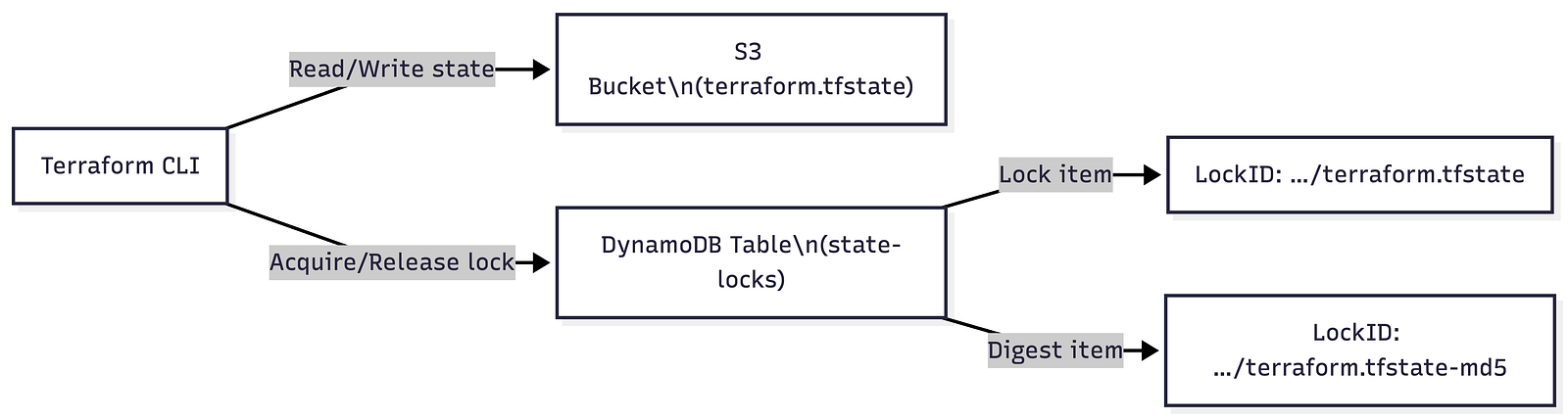
Key insight — DynamoDB stores two items per state file, not one:

When apply finishes normally, Terraform:
Writes the new state to S3.
Computes the MD5 of that file and stores it in the
-md5item.Releases the lock by deleting the lock item.
When the runner is killed mid-apply, steps 2 and 3 never happen. That leaves you with two problems, not one.
Diagnosis: Two Problems, Not One
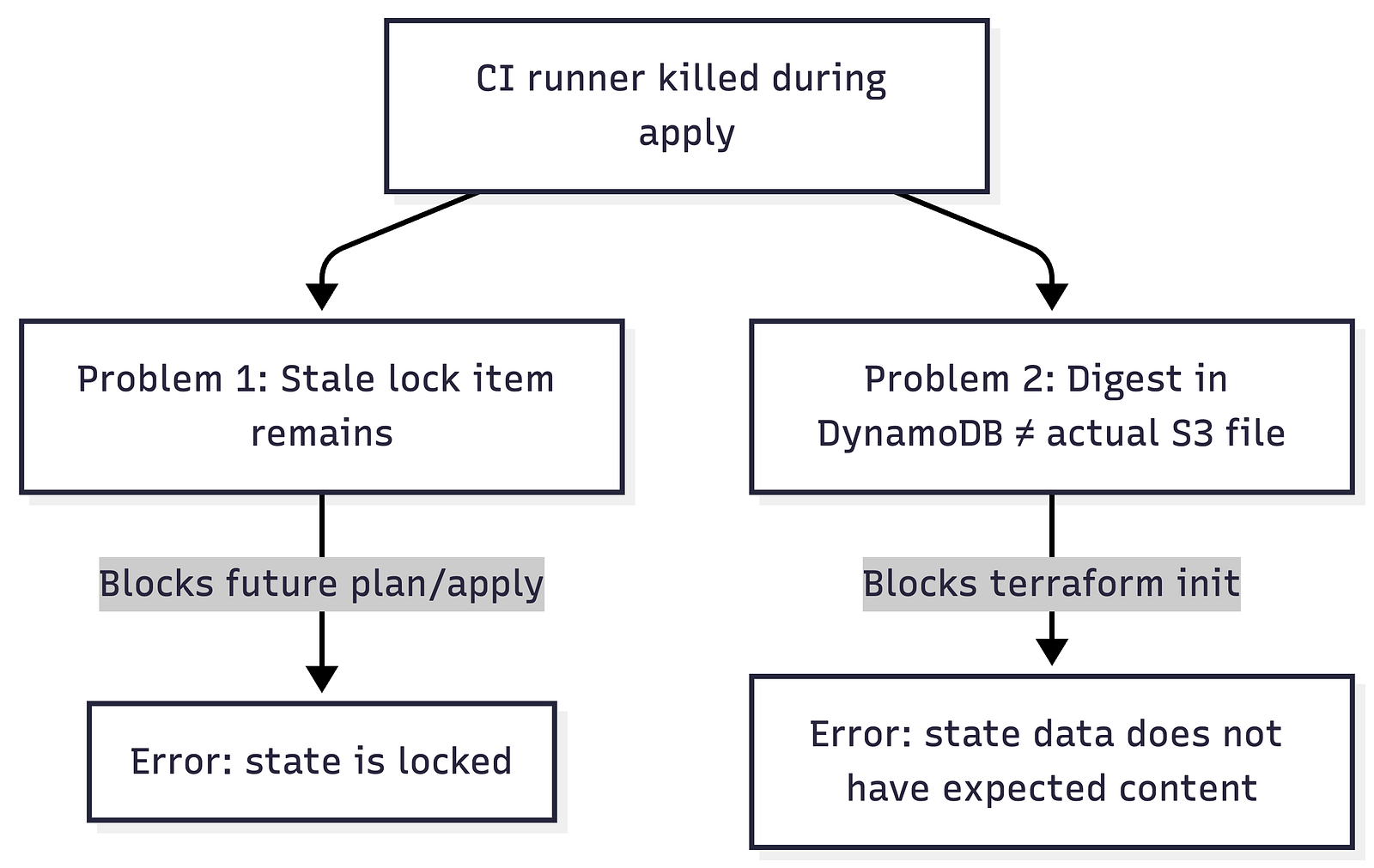
Problem 1: Stale Lock
The lock item at …/terraform.tfstate was never released because the runner was killed. Any future plan or apply will fail with "state is locked".
Problem 2: Digest Mismatch
The interrupted apply may have written a partial or updated state file to S3, but the MD5 in the -md5 DynamoDB item still reflects the previous state. Terraform computes the MD5 of the current S3 object, compares it to the stored digest, and refuses to proceed because they don't match.
Most Stack Overflow answers jump straight to
force-unlock. That fixes Problem 1 but leaves Problem 2 untouched, and you can't even runforce-unlockuntilinitsucceeds, which it won't until the digest is fixed.
The 7-Step Recovery
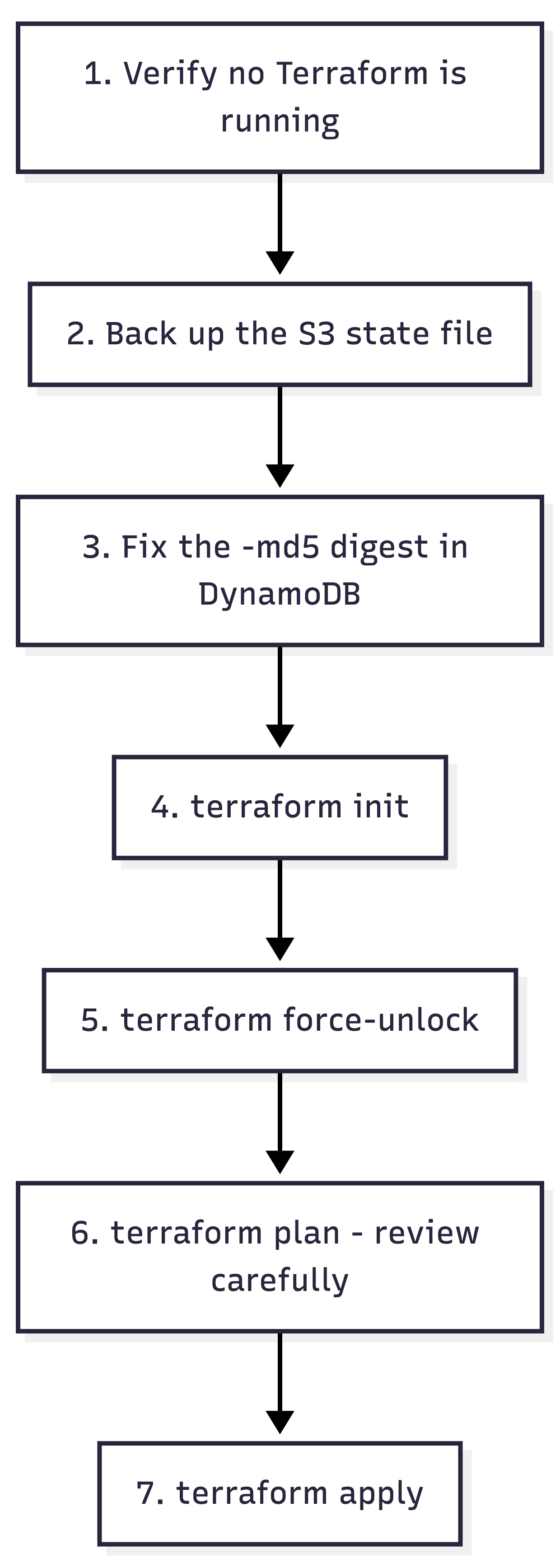
Step 1: Confirm nothing is running
Check GitHub Actions for any in-flight runs of your apply workflow. Check local terminals too. Running force-unlock while a legitimate operation is in progress will corrupt state.
Step 2: Back up the S3 state file
In the S3 bucket, locate global/ecr/terraform.tfstate (or your equivalent key):
Verify it exists and is non-zero.
If S3 versioning is enabled, download the current and previous version. The current one may be partially written.
aws s3 cp s3://your-bucket/global/ecr/terraform.tfstate ./terraform.tfstate.bak
Step 3: Patch the digest in DynamoDB
Open DynamoDB → your lock table → Explore items. Search for the item whose LockID ends with -md5:
your-bucket/global/ecr/terraform.tfstate-md5
If the item exists: update its
Digestattribute to the value from the error message (e.g.a1b2c3d4e5f6a7b8c9d0e1f2a3b4c5d6).If it doesn’t exist: create a new item with
LockID=…-md5andDigest= that hash.
Why this value? Terraform already computed the MD5 of the current S3 object and told you in the error. You’re simply telling DynamoDB “yes, that’s the right file.”
Step 4: Run terraform init
terraform init
This should now succeed. If it still fails with the digest error, double-check the LockID key — the path must exactly match.
Step 5: Force-unlock the stale lock
terraform force-unlock <LOCK-ID>
The lock ID is the UUID from the lock item’s Info JSON. Terraform will prompt for confirmation.
Step 6: Plan and review
terraform plan
Review carefully. Some resources may have been created by the interrupted apply. The plan shows exactly what’s pending.
Step 7: Apply
terraform apply
Why Order Matters

You cannot skip ahead. init needs a valid digest. force-unlock needs a successful init. plan/apply need the lock released. The dependency chain is strict.
Preventing This Next Time
A few guardrails I’ve added since this incident:
S3 versioning: Always enabled on the state bucket. Gives you a rollback path if the state file itself is corrupted.
CI timeouts with grace periods: Set workflow
timeout-minutesgenerously and add a cleanup step that logs the lock ID on failure.Alerting on stale locks: A simple scheduled Lambda that scans the DynamoDB lock table for items older than N hours and posts to Slack.
State backup before apply: Add a pre-apply step in CI that copies the current state to a versioned “backup” prefix in S3.
Note on Terraform 1.10+: Terraform now supports S3-native state locking without DynamoDB. If you’re starting fresh, consider this path, the digest/lock split issue goes away entirely.
References
Terraform S3 Backend Documentation: Official backend config reference including new S3-native locking.
terraform force-unlock Command: CLI reference for manual lock removal.
GitHub Issue #20708: Community thread on the exact “state data does not have expected content” error.
Terraform State Corruption Recovery (Medium): A complementary deep dive on state corruption scenarios.
Managing Terraform State on AWS (Terrateam): Solid end-to-end guide on S3 + DynamoDB setup with GitHub Actions.
Thank you for reading this article! 🙏 If you’re interested in DevOps, Security, or Leadership for your startup, feel free to reach out at hi@iamkaustav.com or book a slot in my calendar.
👉 Don’t forget to subscribe to my newsletter for more insights on my security and product development journey. Stay tuned for more posts!
💡 One shameless promotion: I’m building an easy-to-use freelance management service for technical freelancers. Check it out here → https://www.getprismo.app/. If you are interested to secure limited seats of early adopters, Join the waitlist.
About the author
Hey, Thanks for taking the time to read this.
I'm a software enthusiast with over 10 years of experience in crafting software and organization. I thrive on taking on new challenges and exploring innovative ideas. When I'm not busy coding, I love to travel the world and have already visited 10 countries with 4 more on my upcoming list. I'm also passionate about discussing music, life, and new ideas. If you need someone to listen to your innovative idea, don't hesitate to buzz me. I'm always open to collaborating and lending an ear. With my passion for creativity and my drive to excel, I'm confident that I can help you take your project to the next level. Let's work together to turn your vision into a reality!
Comments
Join the discussionNo comments yet. Be the first to comment.
Operational Excellence
Operational excellence (OpEx) is an approach to software development that emphasizes continuous improvement across all aspects of the product.